Starting a freelancing career is exciting, but one of the biggest hurdles beginners face is creating a Freelance portfolio. Clients want to see proof of your skills before hiring you. The good news? You don’t need prior clients to build a strong portfolio.
In this guide, we’ll show you a step-by-step process to create your first freelance portfolio, attract clients, and start building credibility.
Step 1: Choose Your Freelancing Niche
Before creating a portfolio, you need to decide what services you offer. Your portfolio should showcase the skills clients are looking for.
💡 Examples of beginner-friendly niches:
-
Writing: blog posts, product descriptions, social media captions
-
Graphic design: social media posts, flyers, logos
-
Virtual assistance: data entry, spreadsheets, email management
-
Video editing: short clips, social media reels, subtitles
Tip: Focus on one niche first to make your portfolio clear and targeted.
Step 2: Gather or Create Sample Work
Even without clients, you can create portfolio samples that demonstrate your ability.
Ideas for creating samples:
-
Write 2–3 blog posts if you’re a writer
-
Design social media posts or banners using Canva
-
Create sample spreadsheets or email templates for admin work
-
Edit short videos or reels for social media
Tip: Make your samples realistic and professional, as if they were for a paying client.
Step 3: Organize Your Freelance Portfolio Content
A portfolio should be easy to navigate and visually appealing. Structure your samples clearly.
Recommended portfolio structure:
-
Introduction/About Me: Short description of who you are and what you do
-
Services Offered: Clearly list the services clients can hire you for
-
Portfolio Samples: 3–5 well-made projects with descriptions
-
Contact Information: Email, social media, or freelancing platform links
💡 Tip: Less is more. A small, focused portfolio is better than a large but messy one.
Step 4: Choose a Platform to Showcase Your Freelance Portfolio
You don’t need a website to start — there are many free and easy options:
| Platform | Best For |
|---|---|
| Canva | Visual portfolio, design-focused work |
| Google Drive | Shareable folders with PDFs or images |
| Notion | Clean, professional layout for multiple types of work |
| Wix / WordPress | Personal website with more customization |
| Fiverr / Upwork | Portfolio attached to your freelancing profile |
💡 Tip: Start simple. You can upgrade to a full website later as you gain clients.
Step 5: Add Descriptions and Context
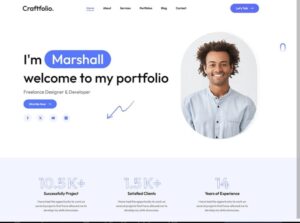
Clients like to know what you did and why it matters. For each portfolio item, include:
-
What the project is
-
Your role or contribution
-
The tools used
-
Results or outcomes (even hypothetical if it’s a sample project)
Example:
Instagram banner designed for a small business using Canva. Focused on readability and brand colors to increase social media engagement.
Related Article: Beginner Freelancer Mistakes and How to Avoid Them
Step 6: Make It Easy to Contact You
Include a clear call-to-action (CTA) so potential clients can reach you easily.
-
Email address
-
Freelancing platform profile links (Fiverr, Upwork, etc.)
-
Social media handles (if relevant)
💡 Tip: Consider adding a simple “Hire Me” button if using a website.
Step 7: Keep Updating Your Freelance Portfolio
A portfolio is never “finished.” As you complete real projects:
-
Replace sample work with client projects
-
Update descriptions and outcomes
-
Highlight your best and most recent work
💡 Tip: Update your portfolio monthly to keep it fresh and relevant.
Creating your first freelance portfolio might feel intimidating, but by following these steps, you can showcase your skills even without prior clients.
-
Pick a niche
-
Create sample work
-
Organize content clearly
-
Choose a platform to display your work
-
Add descriptions and contact info
-
Keep updating as you grow
With a professional and targeted portfolio, you’ll have the confidence to apply for freelance jobs, attract clients, and start earning.
Call-to-Action:
Need help creating your first freelance portfolio? Check out “Freelancer Portfolio Template” for Notion. Notionland also offers free “Portfolio Website” templates. https://www.notionland.co/templates/portfolio-website?utm_source=chatgpt.com free beginner-friendly templates and sample projects to get started today!

Great article! I appreciate how you addressed common weight loss mistakes and explained how to avoid them. Many people struggle because of misinformation, and posts like this help clear things up. The tone is encouraging and informative, which makes it enjoyable to read.